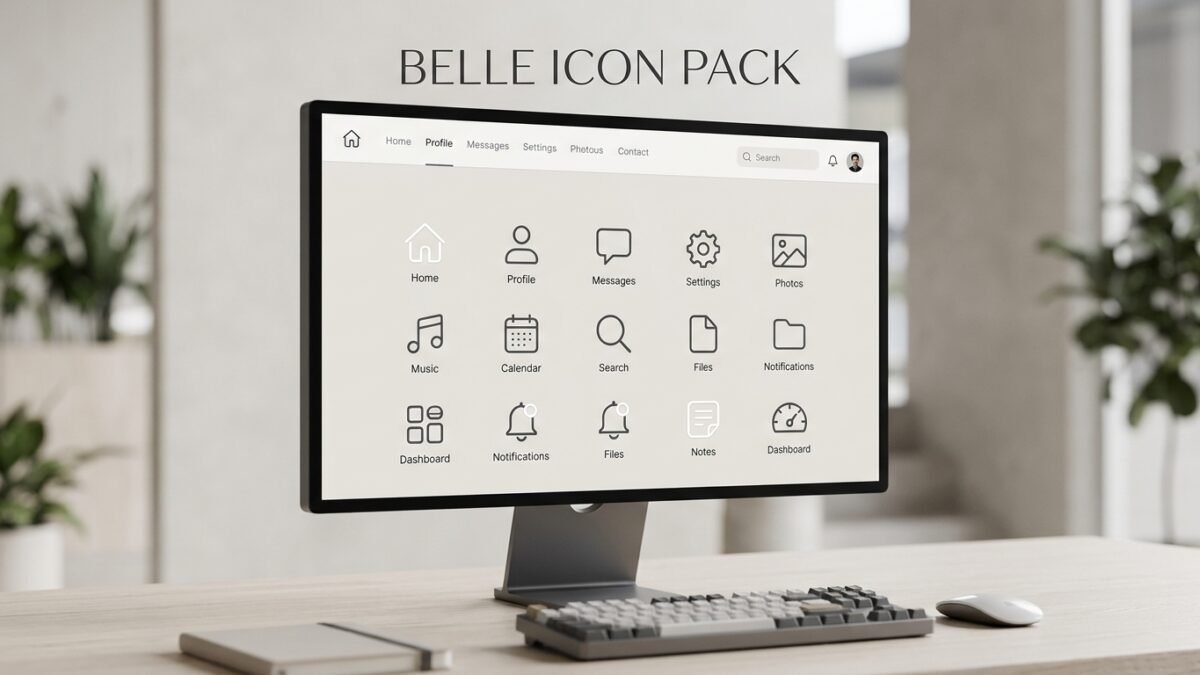
The Belle icon pack is a curated set of UI icons designed for simplicity and visual consistency. It suits beginners and small business owners who need clean, cohesive icons for websites, apps, or presentations without hiring a dedicated designer.
A website or app without clear icons forces users to read more and think harder than necessary. Icons act as visual shorthand — they tell people where to click before they finish reading a single word. The Belle icon pack addresses this directly: it’s a set of simplified, consistent icons built for people who need professional visuals without a design background.
This guide covers what the Belle icon pack includes, who benefits most from using it, and how to apply it to your own project.
What is the Belle icon pack?
The Belle icon pack is a collection of pre-designed icons styled for modern, minimal interfaces. Each icon follows a consistent line weight, corner radius, and visual grammar — meaning one icon won’t look out of place next to another, even across different categories like navigation, e-commerce, or social media.
Consistency matters because mismatched icon styles make a product feel unfinished. A rounded icon next to a sharp-edged one signals to users, even subconsciously, that something wasn’t carefully built.
Who should use the Belle icon pack?
Beginners and small business owners benefit most from the Belle icon pack. Neither group typically has time to commission custom icon sets or the design background to build one from scratch.
- Beginner designers get a ready-made system that teaches visual consistency by example.
- Small business owners get professional-looking icons for a website, app, or pitch deck without hiring a designer.
- Freelancers and solopreneurs save hours they’d otherwise spend hunting for matching icons across multiple free resources.
Choose the Belle icon pack if consistency and speed matter more than fully custom branding. If your brand requires a unique visual identity at launch, a custom icon set built by a designer may serve you better long term.
How do you use the Belle icon pack effectively?
Follow these steps to apply the pack without creating visual clutter:
- Pick a primary use case. Decide whether the icons will anchor navigation, highlight features, or support calls to action. This keeps your icon choices purposeful instead of decorative.
- Match icon size to context. Navigation icons typically need more visual weight than inline icons next to body text.
- Keep color consistent. Apply one accent color across all icons rather than mixing colors icon by icon.
- Test at actual size. An icon that looks clear at 200% zoom may blur or lose detail at 16px. Preview icons at the size they’ll actually appear.
- Pair icons with labels when meaning isn’t obvious. A gear icon reads clearly as “settings,” but more abstract icons benefit from a short text label underneath.
A well-applied icon pack should feel invisible to the user — noticed only when it’s missing or wrong.
What should you check before downloading an icon pack?
Before committing to any icon set, including Belle, confirm three things: license terms (commercial use permissions), file format compatibility (SVG for scalability, PNG for quick use), and coverage (does it include the categories your project actually needs). Skipping this step is the most common reason beginners end up switching icon packs mid-project.
Key Takeaways
The Belle icon pack gives beginners and small business owners a fast path to a clean, consistent visual system. Start by identifying your primary use case, apply the icons consistently in size and color, and confirm licensing before you build your project around them. Download the Belle icon pack and test it against your current layout to see how much faster your design decisions become.
FAQ
Is the Belle icon pack free to use commercially?
License terms vary by provider and package tier, so confirm commercial usage rights before applying the icons to a paid product or client project.
What file formats does the Belle icon pack come in?
Most icon packs, including style-consistent sets like Belle, are distributed in SVG (scalable, ideal for responsive design) and PNG (fixed size, easier for quick use in documents or slides).
Can beginners customize the Belle icon pack?
Yes. SVG files can be recolored, resized, and lightly edited in free tools like Figma or Inkscape without needing advanced design skills.
How is the Belle icon pack different from generic icon libraries?
Generic libraries often mix styles from multiple contributors, creating visual inconsistency. A cohesive pack like Belle applies one consistent design system across every icon.
Do I need design experience to use an icon pack like Belle?
No. Icon packs are built specifically so non-designers can apply professional visuals without custom design work.