Technology works by converting input (data or commands) into output (actions or results) through hardware, software, and networks working together. Hardware provides the physical components, software tells hardware what to do, and networks connect devices so they can share information — together, these three layers power everything from smartphones to point-of-sale systems.
Technology can feel like a black box, especially if you’re running a small business and relying on tools you don’t fully understand. You tap an app, and a sale processes. You send an email, and it lands in a customer’s inbox seconds later. But what’s actually happening underneath?
This guide breaks down how technology works in plain terms, built for beginners and small business owners who want a working understanding — not a computer science degree. By the end, you’ll know the core components involved, how they interact, and where to look when something goes wrong.
What are the core components of how technology works?
Technology works through three interconnected layers: hardware, software, and networks. Each layer plays a distinct role, and none function without the others.
What is hardware, and what does it do?
Hardware is the physical equipment that makes up a device — processors, memory, storage drives, and input/output components like keyboards or touchscreens. The processor (also called the CPU, or central processing unit) executes instructions. Memory (RAM) temporarily holds data the processor needs right now. Storage (an SSD or hard drive) holds data long-term, even when the device is off.
A business laptop, a credit card reader, and a cloud server all rely on this same basic structure — differing only in scale and purpose.
What is software, and how does it control hardware?
Software is the set of instructions that tells hardware what to do. It comes in two main types:
- Operating systems (like Windows, macOS, or iOS) manage hardware resources and let other programs run.
- Applications (like your point-of-sale system or accounting tool) perform specific tasks for the user.
When you open an app, the operating system allocates memory and processing power to it. The app then executes its own code to perform your request — processing a payment, saving a file, or rendering a webpage.
What are networks, and why do they matter?
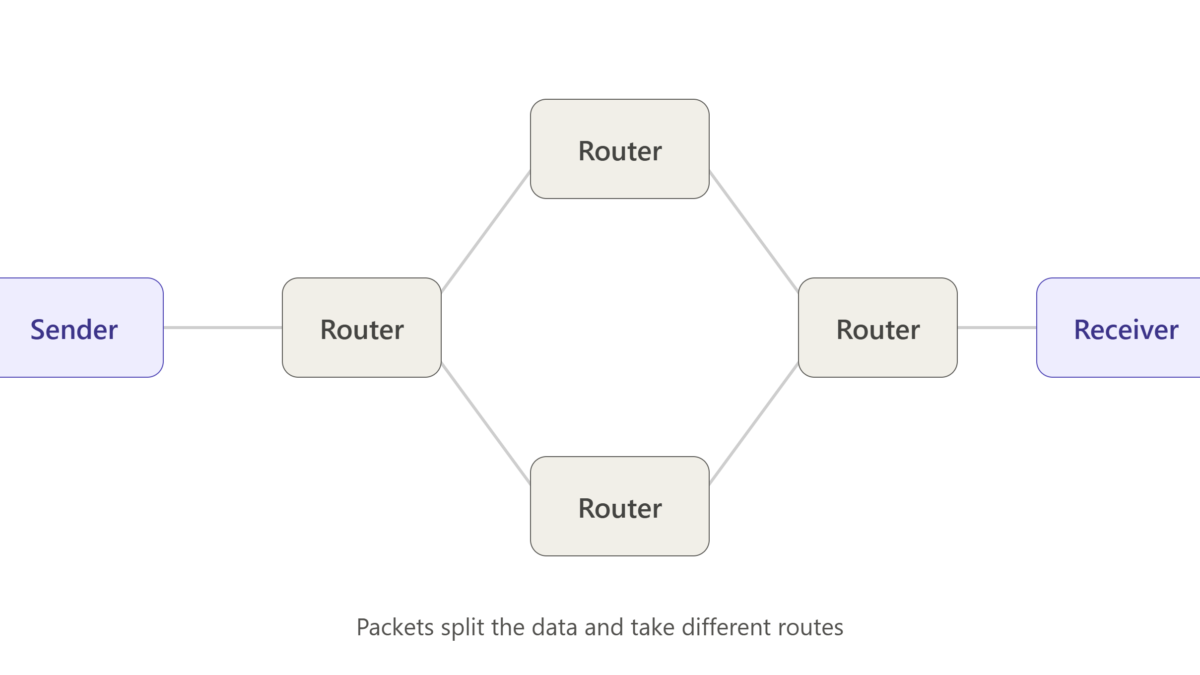
A network connects devices so they can exchange data. The internet is the largest example — a global network of networks that routes information between devices using standardized protocols (rules for how data is formatted and transmitted).
When you send an email, your device breaks the message into small units called packets, sends them across the network, and the recipient’s device reassembles them. This happens in milliseconds, which is why the process feels instant even though it involves multiple steps and systems.
How do hardware, software, and networks work together?
These three layers form a simple cycle: input, processing, and output.
- Capture input. A user action — a tap, a keystroke, a card swipe — generates data.
- Process the data. Software interprets the input and tells hardware how to respond. The processor executes the relevant instructions.
- Produce output. The result appears — a screen updates, a receipt prints, a payment confirms.
- Transmit if needed. If the action involves another device or service, the network carries the data to its destination and back.
A card payment at a small retail shop illustrates this well: the card reader (hardware) captures the transaction, the payment software processes it, and the network sends the request to the bank and returns an approval — all within a few seconds.
Why does understanding this matter for small business owners?
Understanding this framework helps you troubleshoot problems faster and make smarter purchasing decisions. If a payment system fails, you can narrow the issue down: Is it the device (hardware), the app (software), or the internet connection (network)? That diagnostic instinct saves time and reduces reliance on outside support for simple fixes.
Choose cloud-based software if your priority is remote access and automatic updates. Choose locally installed software if your priority is working without a stable internet connection.
Key takeaways
Technology runs on three layers working in sequence: hardware executes, software instructs, and networks connect. Once you understand that input moves through processing and output, every device — from a smartphone to a point-of-sale terminal — becomes easier to use and troubleshoot.
Start applying this framework the next time something malfunctions: identify which layer is failing before assuming the entire system is broken. For deeper reading on networking fundamentals, see resources from Cisco Networking Academy or NIST.
FAQ
What is the simplest way to explain how technology works?
Technology converts input into output using hardware (physical components), software (instructions), and networks (connections between devices) working together in sequence.
What’s the difference between hardware and software?
Hardware is the physical equipment a device is made of — like a processor or screen. Software is the set of instructions that tells that hardware what to do.
Do small businesses need to understand networking to use technology effectively?
A basic understanding helps you troubleshoot connectivity issues and choose the right tools, but you don’t need technical expertise to use most business technology day to day.
How does the internet fit into how technology works?
The internet is a global network that connects devices, allowing software on one device to send and receive data from another — enabling things like online payments, email, and cloud storage.
What should I check first when a piece of technology stops working?
Determine which layer is failing: check the physical device (hardware), restart the application (software), and confirm your internet connection (network) before assuming a bigger problem.